Working in VS Code
This page takes a developer from a clean machine to a breakpoint in the API, a Chrome window on the page and three green test suites, in VS Code, with screenshots of the editor as it goes. It covers TheYard and The Shed, because both live in this repository and both are set up the same way. Everything here was run again from a fresh clone of the shipped commit on 13 October 2026, and the times beside each step are from that run.
In plain words
Open the folder, say yes to the extensions it recommends, press F5. That is the whole setup, because the repository carries its own editor configuration: what to build, what to run, which ports, which tests, and which extensions, all in a .vscode folder beside the code. A new developer gets the same editor as everyone else without copying settings from anyone.
What that is worth: a developer makes a first change and watches it under the debugger inside the first half hour, with no walkthrough; and the organization can hand this repository to a new hire, a reviewer or a demo laptop and have it run the same way every time.
Before you start
Four installs, once per machine. On Windows, one line in a terminal does the first two:
winget install OpenJS.NodeJS.LTS Microsoft.DotNet.SDK.10
No database to install. With no connection string the API writes to a SQLite file in your temp folder and the catalogue is read from data/, so the first run serves 100,000 vehicles on its own. The Shed needs nothing but the SDK: its page is TypeScript compiled to wwwroot/js, and the output is committed.
Step 1: clone and open
git clone https://github.com/SteveStout/TheYard.git
cd TheYard
npm ci
code .
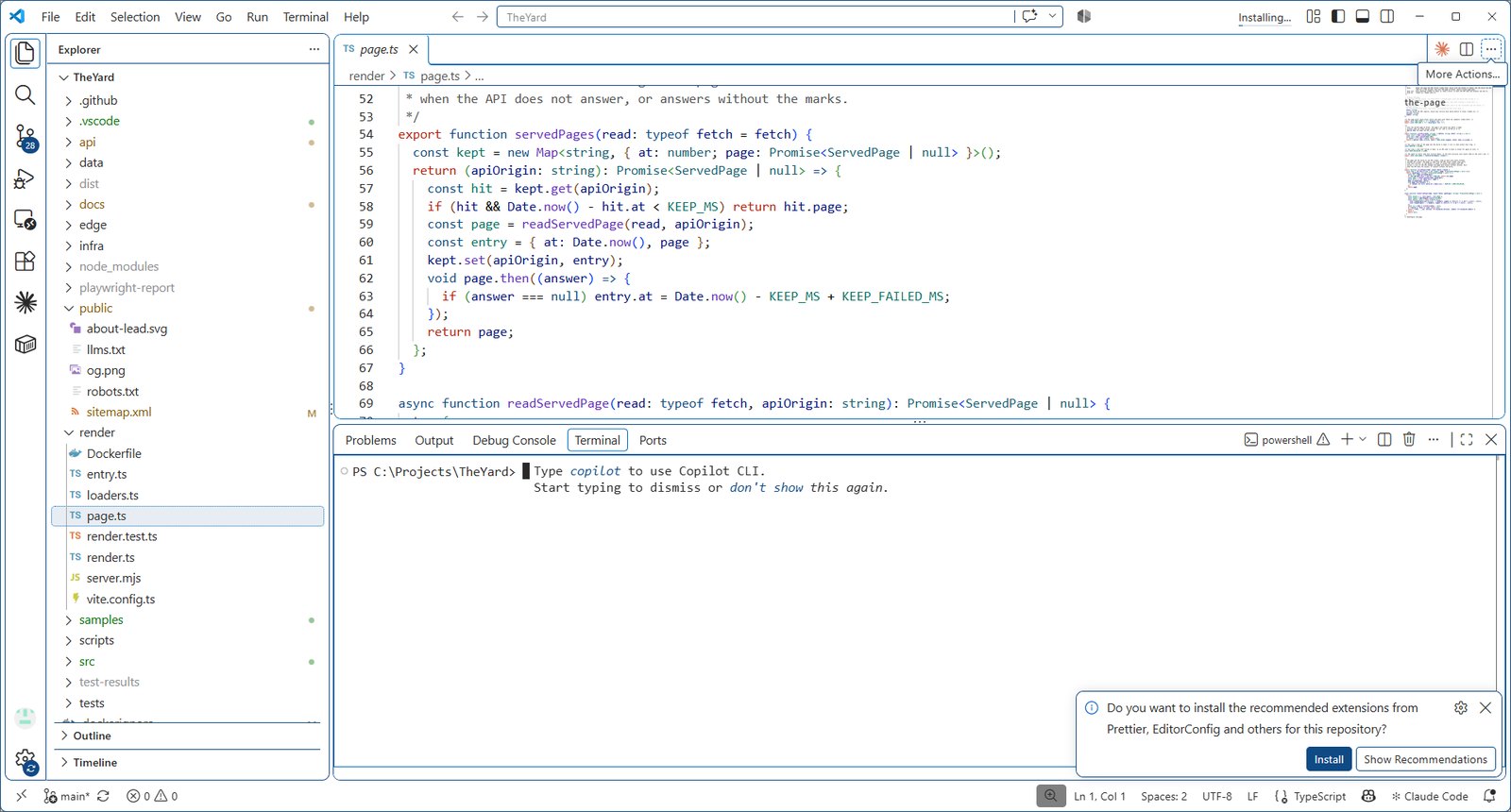
npm ci installs the front end's packages exactly as package-lock.json has them (19 seconds on a four-core laptop). code . opens the folder in VS Code. The first time it opens, VS Code reads .vscode/extensions.json and offers the extensions this repository is built with:
Step 2: install the recommended extensions
Press Install All on that notice, or open the Extensions view (Ctrl+Shift+X) and type @recommended. The list is the one in the file below, each with its reason beside it:
{
"recommendations": [
"ms-dotnettools.csharp",
"ms-dotnettools.csdevkit",
"esbenp.prettier-vscode",
"oxc.oxc-vscode",
"vitest.explorer",
"ms-playwright.playwright",
"editorconfig.editorconfig",
"ms-azuretools.vscode-containers",
"ms-azuretools.vscode-bicep"
]
}
Live from .vscode/extensions.json, region *, read from this build at 9094953.
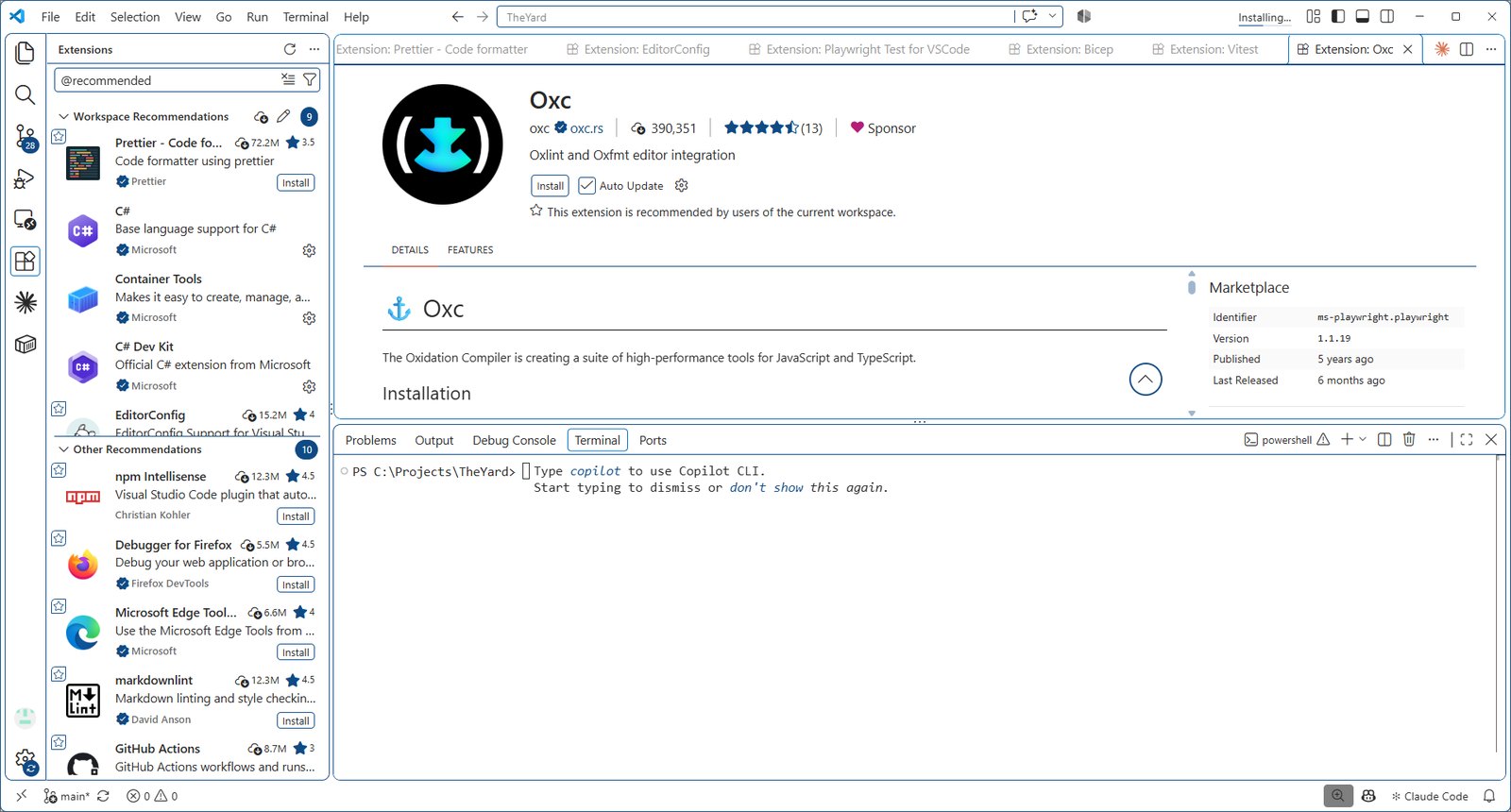
C# Dev Kit opens api/TheYard.slnx on its own, because .vscode/settings.json names it as the default solution. Give it a minute the first time: it restores the ten projects and the Testing panel fills with the xUnit tests.
Step 3: run it
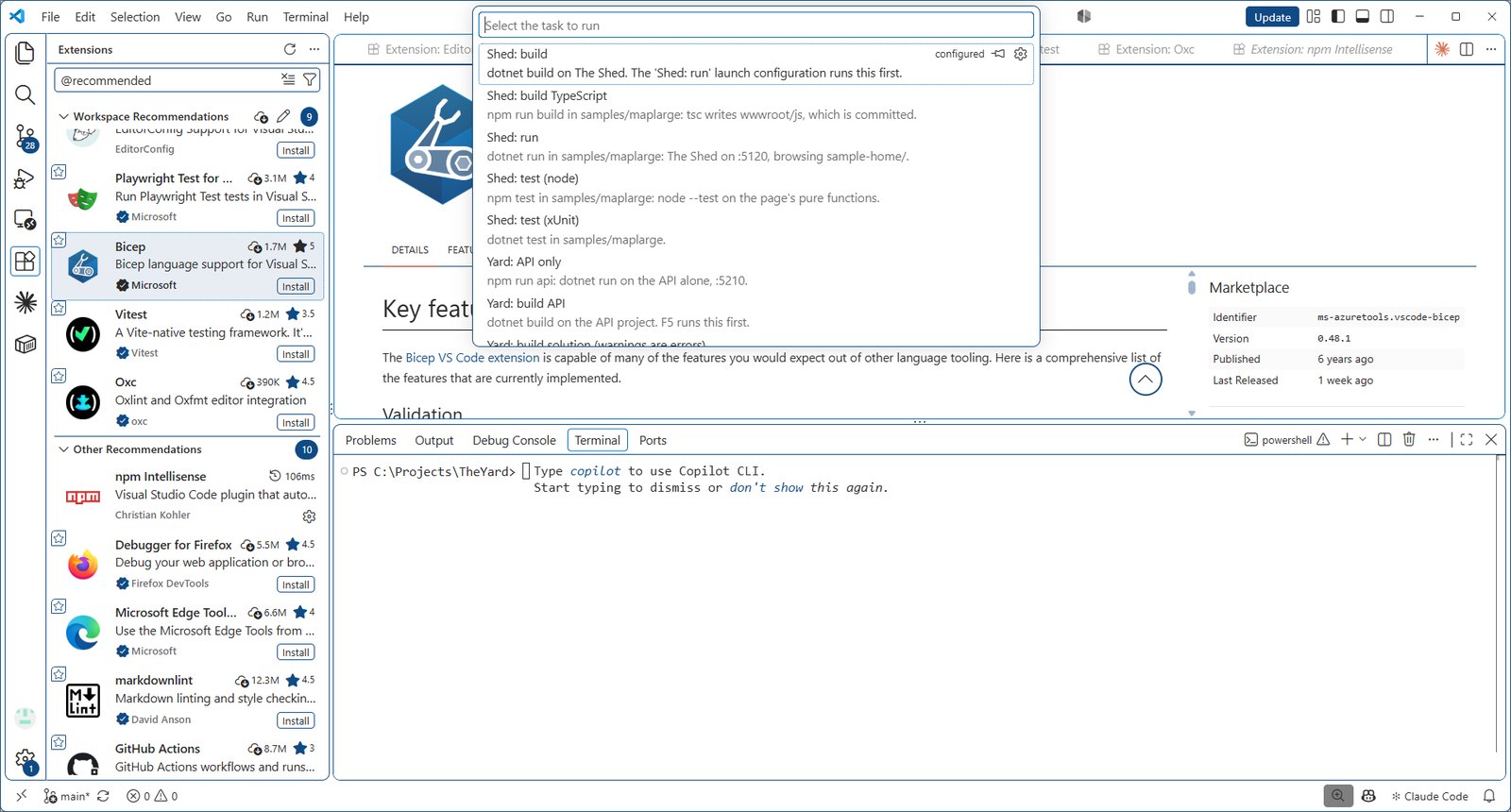
Terminal > Run Task (or Ctrl+Shift+P, then "Run Task") lists every command in .vscode/tasks.json. Pick Yard: start (API + web).
The task is npm start: one terminal, the API in blue on http://localhost:5210 and Vite in green on http://localhost:5173, and Chrome opens on the page when Vite is ready. Vite proxies /api to the API, so the page and the API are one address in the browser. From the fresh clone Vite was ready in 3 seconds and the API, which builds first, answered in 40.
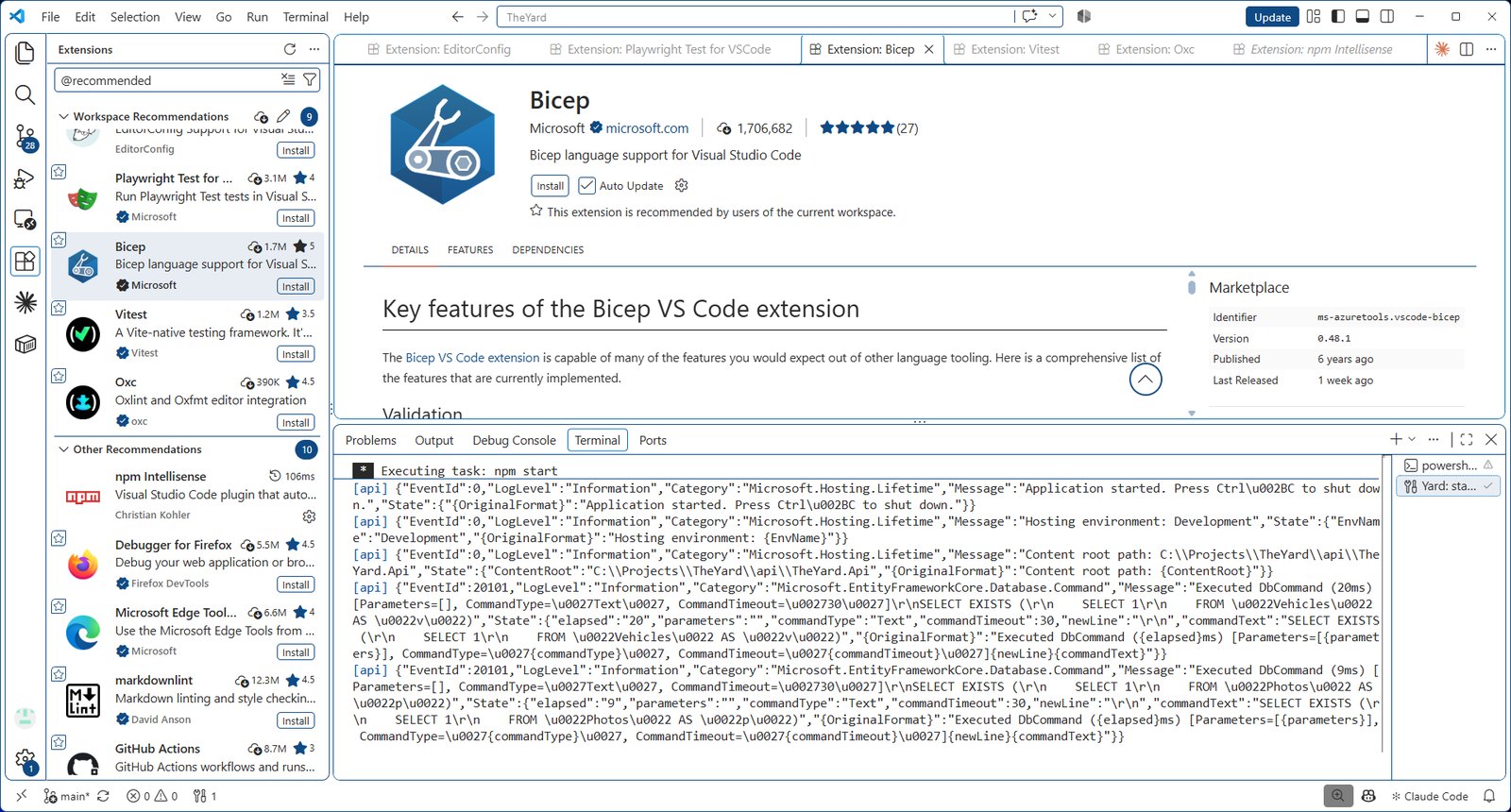
To stop it, press the trash icon on that terminal, or Ctrl+C in it. The other run tasks start one half on its own (Yard: API only, Yard: web only (Vite)), which is what the debugger uses.
Step 4: F5, a breakpoint on each side
Open Run and Debug (Ctrl+Shift+D). The configurations come from .vscode/launch.json; pick Yard: API + web (F5) from the list at the top (it is the last of the four; VS Code starts on the first, Yard: API, and remembers your choice after that). It is a compound that starts the API under the .NET debugger and then Chrome, attached, on the page. Press F5.
{
"version": "0.2.0",
"configurations": [
{
"name": "Yard: API",
"type": "coreclr",
"request": "launch",
"preLaunchTask": "Yard: build API",
"program": "${workspaceFolder}/api/TheYard.Api/bin/Debug/net10.0/TheYard.Api.dll",
"cwd": "${workspaceFolder}/api/TheYard.Api",
"env": {
"ASPNETCORE_ENVIRONMENT": "Development",
"ASPNETCORE_URLS": "http://localhost:5210"
},
"console": "internalConsole",
"stopAtEntry": false
},
{
"name": "Yard: web in Chrome",
"type": "chrome",
"request": "launch",
"preLaunchTask": "Yard: web only (Vite)",
"url": "http://localhost:5173",
"webRoot": "${workspaceFolder}"
},
{
"name": "Shed: run",
"type": "coreclr",
"request": "launch",
"preLaunchTask": "Shed: build",
"program": "${workspaceFolder}/samples/theshed/bin/Debug/net10.0/TestProject.dll",
"cwd": "${workspaceFolder}/samples/theshed",
"env": {
"ASPNETCORE_ENVIRONMENT": "Development",
"ASPNETCORE_URLS": "http://localhost:5120"
},
"console": "internalConsole",
"checkForDevCert": false,
"serverReadyAction": {
"action": "openExternally",
"pattern": "\\bNow listening on:\\s+(https?://\\S+)"
}
}
],
"compounds": [
{
"name": "Yard: API + web (F5)",
"configurations": ["Yard: API", "Yard: web in Chrome"],
"stopAll": true
}
]
}
Live from .vscode/launch.json, region *, read from this build at 9094953.
Put a breakpoint on the first line of List in api/TheYard.Api/Features/Vehicles/VehicleEndpoints.cs (click in the gutter left of the line number), then press Load more on the page. The debugger stops in the API with the request's query in the Variables pane; F5 lets it go. A breakpoint in a .tsx file under src/ stops Chrome the same way, through Vite's source maps.
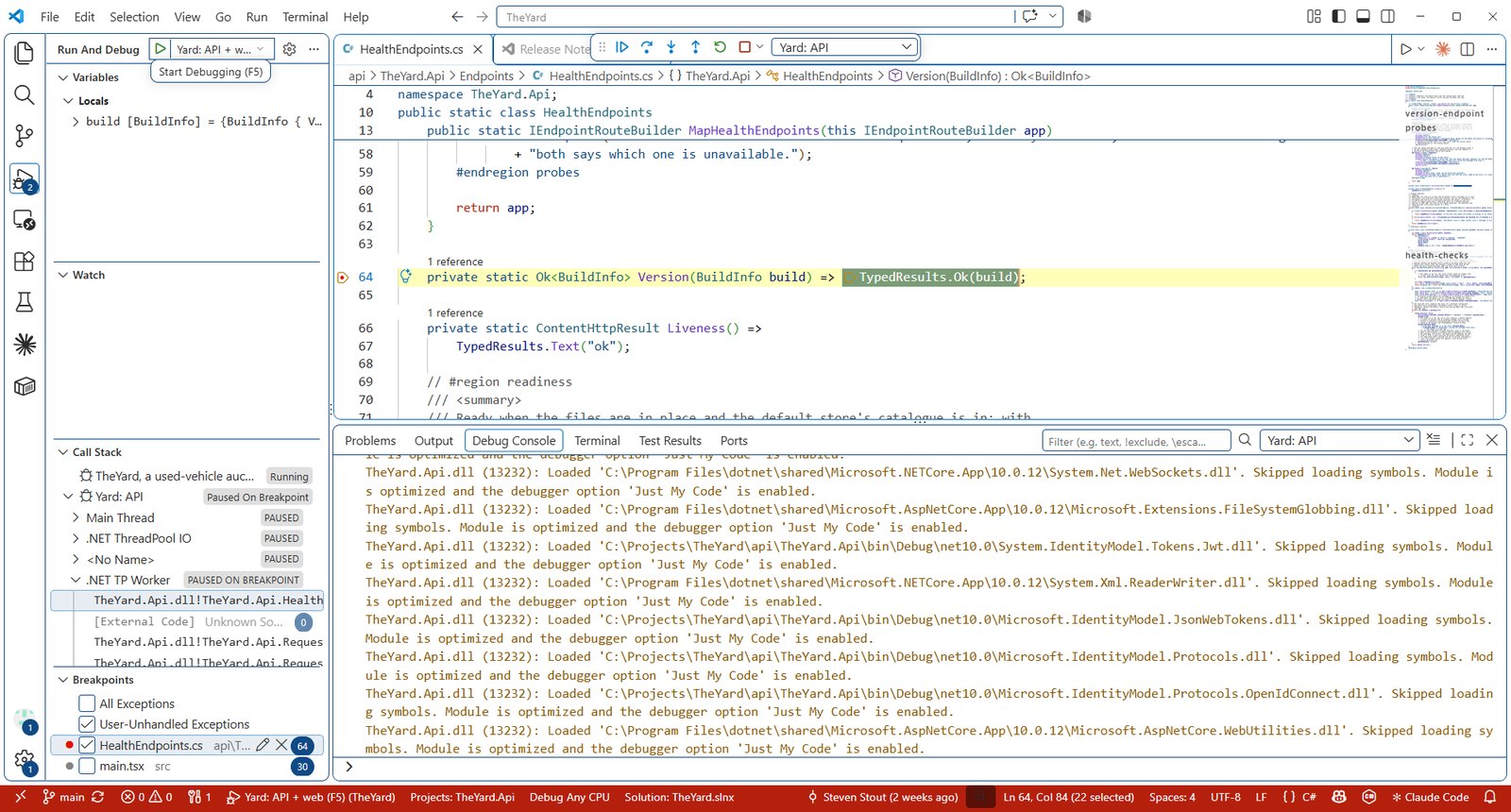
The compound builds the API first (the task Yard: build API, also Ctrl+Shift+B), waits for Vite to print its address, and stops both when either stops. The ports are the ones in api/TheYard.Api/Properties/launchSettings.json and vite.config.ts, written out in launch.json so the page and the proxy always meet; WorkspaceTests holds the three files to each other.
Step 5: the tests, in the Testing panel
Open Testing (the flask icon). Three trees: xUnit from C# Dev Kit, Vitest from its extension, and Playwright from its; each tree appears once its extension is installed, and the xUnit one after C# Dev Kit has loaded the solution and found the tests (about a minute the first time). Each test runs or debugs from the play button beside it, and a red one opens on the failing line.
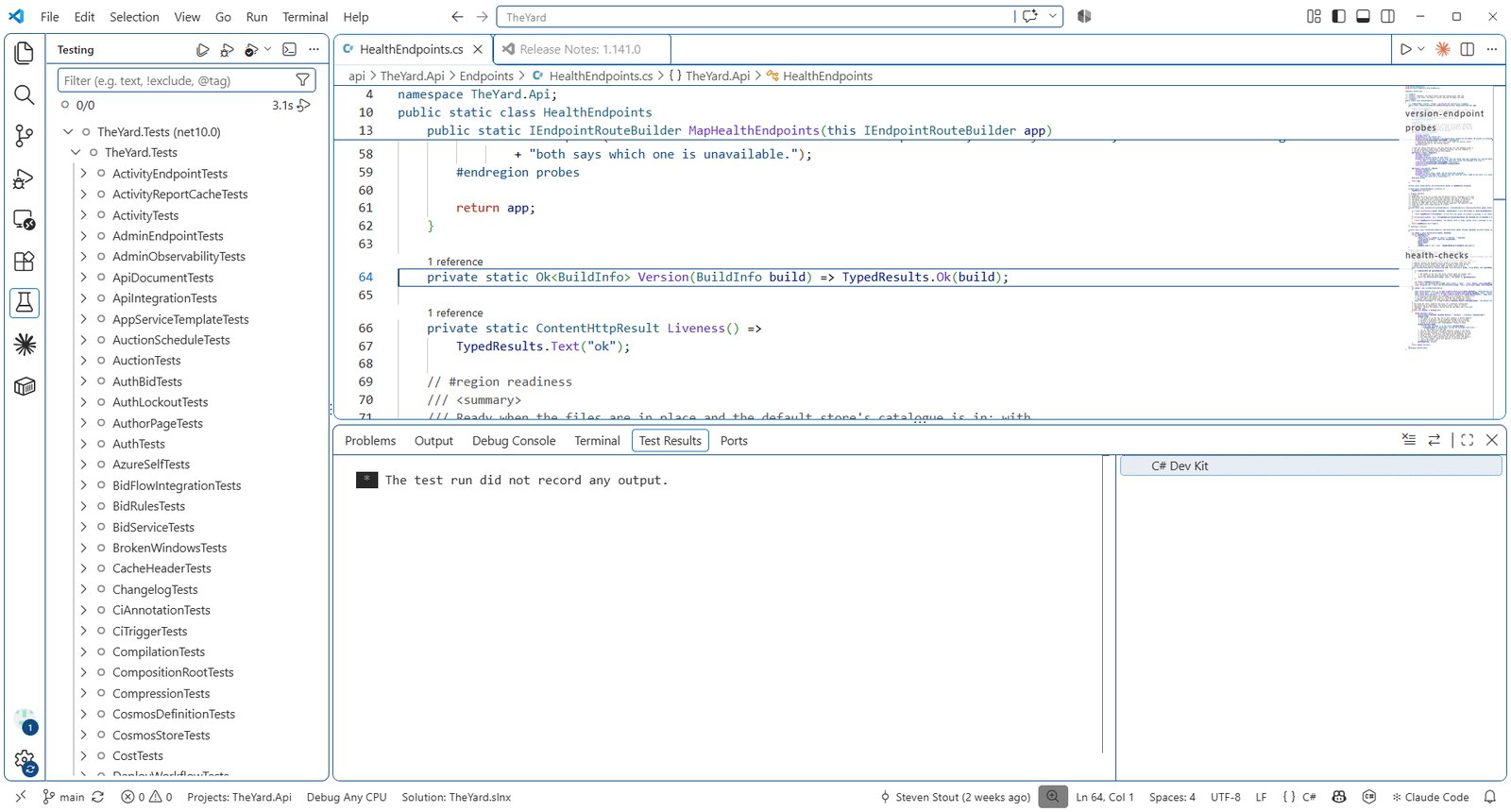
The same suites as tasks, each the README's own command, measured from the fresh clone:
Both unit suites, one command: npm run test:all runs Yard: test (xUnit on SQLite) and then Yard: test (Vitest), each with its output captured, and prints one line per suite:
TheYard - all tests
C# tests (xUnit)      943 passed    0 failed   37.3 s
TypeScript tests      419 passed    0 failed   10.6 s
ALL GREEN - 1362 tests passed
A failing suite prints everything it printed, then the summary, and exits non-zero. npm run test:all:full runs the same two commands with their whole output. The browser suite stays its own command, npm run test:e2e, because it needs the app running and starts both servers itself.
The editor formats on save with the same Prettier and the same .editorconfig the gate checks against, so a change arrives at the gate already formatted. What the gate itself runs, and why a build warning is red, is in ADR-068, the five-minute gate.
Step 6: The Shed
The Shed is the file browser under samples/theshed, one .NET project with its page in plain TypeScript. It runs from this window and from its own.
From this window: select Shed: run in Run and Debug and press F5. It builds, starts on http://localhost:5120, and the browser opens on the page when the API says it is listening. The configuration serves plain http, so it tells the C# extension not to ask for an HTTPS development certificate (checkForDevCert is false). Its tasks (Shed: build TypeScript, Shed: test (xUnit), Shed: test (node)) are in the same Run Task list.
On its own, which is the demo shape: File > Open Folder on samples/theshed. That folder carries its own .vscode with the same launch configuration and tasks, and C# Dev Kit opens TestProject.sln. F5 does the same thing.
Every test, one command: in samples/theshed, run
npm run test:all
It runs the 145 xUnit tests (dotnet test builds first), then the TypeScript build, then the 21 node tests, and stops at the first failure. Each step's output is captured, and a green run prints one line per step:
The Shed - all tests
C# tests (xUnit)     145 passed   0 failed   19.2 s
TypeScript build     clean                    1.5 s
TypeScript tests      21 passed   0 failed    1.4 s
ALL GREEN - 166 tests passed
A failing step prints everything it printed, then the summary, and exits non-zero. npm run test:all:full runs the same three commands with their whole output. With The Shed open as its own folder they are the tasks Shed: test all and Shed: test all (full output) in Run Task. It is the one command to run before a commit.
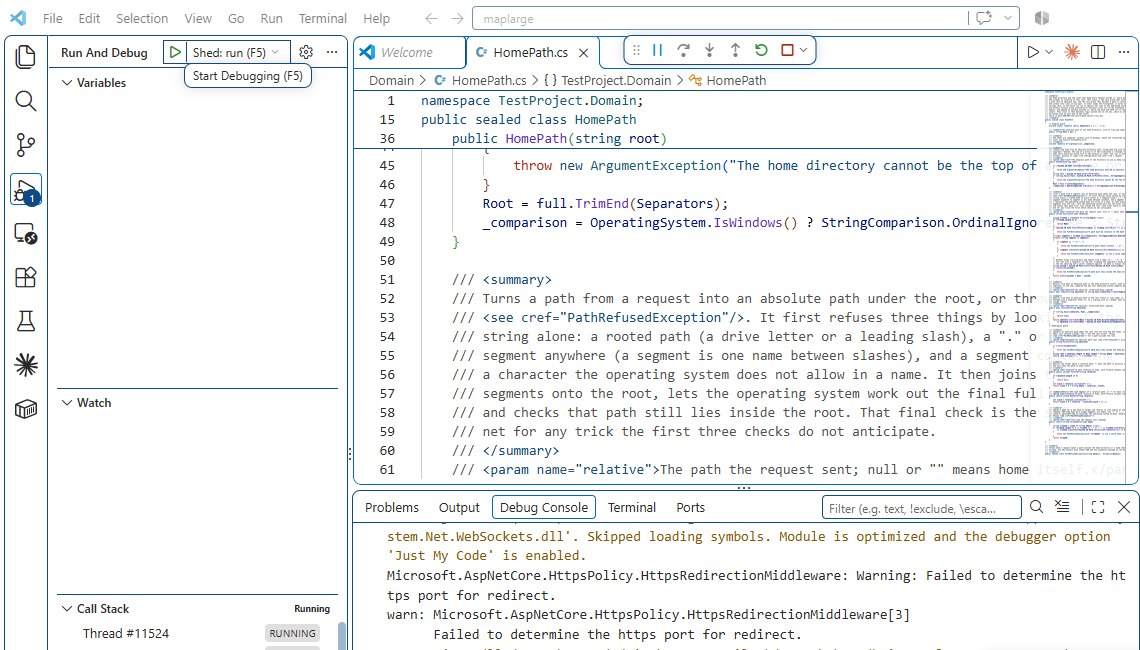
F5 browses sample-home/ inside the repository, so a file uploaded during a demo lands in the working tree. To keep the tree clean, copy sample-home/ somewhere else and point FILES__HOME at the copy, as below.
To browse a folder of your own instead of sample-home/, add "FILES__HOME": "C:\\some\\folder" to the env block of the launch configuration. After any change under src/, run Shed: build TypeScript and commit wwwroot/js with the change: dotnet run needs no Node, which is the point of committing the output (ADR-006 of The Shed, TypeScript organised).
A ten-minute demo
For showing the two projects to someone, in order, with nothing to type:
- Open the TheYard folder. Run and Debug, Yard: API + web (F5). The page opens on Home; open Inventory, filter by make, open a vehicle, Sign in (create an account; it lives in the local SQLite file), place a bid, and watch the room answer within a few seconds.
- Set a breakpoint in
VehicleEndpoints.cs, press Load more, step once, let it go. The API owns the rules; the page asks.
- Testing panel: run one xUnit test from the play button (and one Vitest test, once the Vitest extension is installed). Point at
OnionTests: the rings are tests.
- Open any record from the sidebar on the page (Decision Records): the code in it is read from the build you are running.
- Stop. Open
samples/theshed in a new window, F5. Browse, search *.csv, upload a file, drop a breakpoint in FilesController.cs, download it back.
Every step here is a task or a launch configuration, so the demo is the same on any machine the repository is cloned to.
VS Code: the files this page added, and why
This page shipped with the editor configuration it describes. Every file, and what it is for:
The tasks, read from the build:
{
"version": "2.0.0",
"tasks": [
{
"label": "Yard: start (API + web)",
"detail": "npm start: the .NET API on :5210 and Vite on :5173 in one terminal, and the browser opens.",
"type": "shell",
"command": "npm start",
"isBackground": true,
"problemMatcher": {
"owner": "yard",
"pattern": { "regexp": "^$" },
"background": {
"activeOnStart": true,
"beginsPattern": "VITE v",
"endsPattern": "Local:"
}
},
"presentation": { "reveal": "always", "panel": "dedicated", "group": "run" }
},
{
"label": "Yard: API only",
"detail": "npm run api: dotnet run on the API alone, :5210.",
"type": "shell",
"command": "npm run api",
"isBackground": true,
"problemMatcher": {
"owner": "yard-api",
"pattern": { "regexp": "^$" },
"background": {
"activeOnStart": true,
"beginsPattern": "Building",
"endsPattern": "Now listening on"
}
},
"presentation": { "reveal": "always", "panel": "dedicated", "group": "run" }
},
{
"label": "Yard: web only (Vite)",
"detail": "npm run dev: Vite on :5173, proxying /api to :5210. The launch configuration waits for it.",
"type": "shell",
"command": "npm run dev",
"isBackground": true,
"problemMatcher": {
"owner": "yard-web",
"pattern": { "regexp": "^$" },
"background": {
"activeOnStart": true,
"beginsPattern": "VITE v",
"endsPattern": "Local:"
}
},
"presentation": { "reveal": "always", "panel": "dedicated", "group": "run" }
},
{
"label": "Yard: build API",
"detail": "dotnet build on the API project. F5 runs this first.",
"type": "shell",
"command": "dotnet build api/TheYard.Api/TheYard.Api.csproj",
"problemMatcher": "$msCompile",
"group": { "kind": "build", "isDefault": true },
"presentation": { "reveal": "silent", "panel": "shared" }
},
{
"label": "Yard: build solution (warnings are errors)",
"detail": "dotnet build on every project, the way the gate builds it: any warning is red.",
"type": "shell",
"command": "dotnet build api/TheYard.slnx -warnaserror",
"problemMatcher": "$msCompile",
"group": "build"
},
{
"label": "Yard: build web (tsc + vite)",
"detail": "npm run build: the type check and the production bundle into dist/.",
"type": "shell",
"command": "npm run build",
"problemMatcher": "$tsc",
"group": "build"
},
{
"label": "Yard: test (Vitest)",
"detail": "npm test: the presentation logic, no browser.",
"type": "shell",
"command": "npm test",
"problemMatcher": [],
"group": "test"
},
{
"label": "Yard: test (xUnit on SQLite)",
"detail": "npm run test:api: every xUnit test except the seven that need the live Cosmos DB account.",
"type": "shell",
"command": "npm run test:api",
"problemMatcher": "$msCompile",
"group": { "kind": "test", "isDefault": true }
},
{
"label": "Yard: test (browser, Playwright)",
"detail": "npm run test:e2e: the real stack in Chrome. Starts both servers itself; stop 'Yard: start' first.",
"type": "shell",
"command": "npm run test:e2e",
"problemMatcher": [],
"group": "test"
},
{
"label": "Yard: lint",
"detail": "npm run lint: oxlint, warnings denied.",
"type": "shell",
"command": "npm run lint",
"problemMatcher": [],
"group": "test"
},
{
"label": "Yard: format check",
"detail": "npm run format:check: Prettier on the front end, the way the gate checks it.",
"type": "shell",
"command": "npm run format:check",
"problemMatcher": [],
"group": "test"
},
{
"label": "Yard: format check (C#)",
"detail": "npm run format:api:check: dotnet format with no changes allowed.",
"type": "shell",
"command": "npm run format:api:check",
"problemMatcher": [],
"group": "test"
},
{
"label": "Yard: everything the gate checks (no browser)",
"detail": "Format, lint, type check, Vitest and xUnit in order. The browser suite is its own task.",
"dependsOrder": "sequence",
"dependsOn": [
"Yard: format check",
"Yard: format check (C#)",
"Yard: lint",
"Yard: build web (tsc + vite)",
"Yard: test (Vitest)",
"Yard: test (xUnit on SQLite)"
],
"problemMatcher": [],
"group": "test"
},
{
"label": "Shed: run",
"detail": "dotnet run in samples/theshed: its launch profile, https://localhost:7146 and http://localhost:5120, browsing sample-home/.",
"type": "shell",
"command": "dotnet run",
"options": { "cwd": "${workspaceFolder}/samples/theshed" },
"isBackground": true,
"problemMatcher": {
"owner": "shed",
"pattern": { "regexp": "^$" },
"background": {
"activeOnStart": true,
"beginsPattern": "Building",
"endsPattern": "Now listening on"
}
},
"presentation": { "reveal": "always", "panel": "dedicated", "group": "run" }
},
{
"label": "Shed: build",
"detail": "dotnet build on The Shed. The 'Shed: run' launch configuration runs this first.",
"type": "shell",
"command": "dotnet build samples/theshed/TestProject.csproj",
"problemMatcher": "$msCompile",
"group": "build",
"presentation": { "reveal": "silent", "panel": "shared" }
},
{
"label": "Shed: build TypeScript",
"detail": "npm run build in samples/theshed: tsc writes wwwroot/js, which is committed.",
"type": "shell",
"command": "npm run build",
"options": { "cwd": "${workspaceFolder}/samples/theshed" },
"problemMatcher": "$tsc",
"group": "build"
},
{
"label": "Shed: test (xUnit)",
"detail": "dotnet test in samples/theshed.",
"type": "shell",
"command": "dotnet test",
"options": { "cwd": "${workspaceFolder}/samples/theshed" },
"problemMatcher": "$msCompile",
"group": "test"
},
{
"label": "Shed: test (node)",
"detail": "npm test in samples/theshed: node --test on the page's pure functions.",
"type": "shell",
"command": "npm test",
"options": { "cwd": "${workspaceFolder}/samples/theshed" },
"problemMatcher": [],
"group": "test"
}
]
}
Live from .vscode/tasks.json, region *, read from this build at 9094953.